
SpinRise Casino App
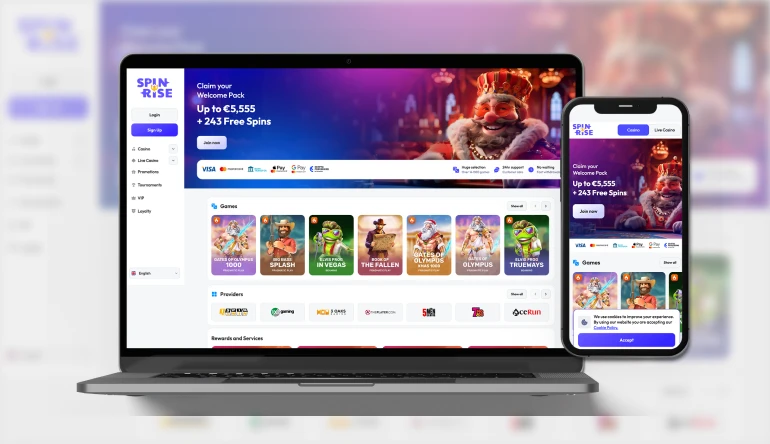


Welcome to our guide on the Spin Rise app, built for anyone who wants their favourite reels, tables and live dealers ready whenever inspiration strikes. Here at SpinRise Casino, we've designed a mobile experience that mirrors the desktop site but fits neatly in your pocket, so whether you're commuting, waiting in line, or relaxing on the sofa, our casino travels with you.
Below, we'll walk you through installation on Android and iOS, show you how to sign in and claim bonuses on the go, and explain what makes our mobile platform worth keeping on your home screen.
Why Players Choose Our Mobile App
We at SpinRise built this app around convenience without cutting corners on features. Here's what keeps players coming back to it:
- No app store download required - install directly from our site in seconds
- Automatic updates, so you're always on the latest version
- Full access to our welcome bonus, free spins and ongoing promotions
- Dark and light themes to suit your preference
- Smooth performance across Android and iOS devices
- 24/7 live chat support built into the app for quick assistance
Whether you're chasing a jackpot between meetings or settling in for a longer live casino session at home, our app is designed to keep the experience consistent, fast and enjoyable.
Getting the Spin Rise App on Your Device
We don't rely on traditional app store listings. Instead, our application is installable directly from our website, which means we can update it instantly and keep it free of the delays that come with app store review processes. The result is a fast, secure progressive web app that behaves just like a native download.
For Android Users
Getting the SpinRise app on an Android phone or tablet only takes a few steps:
- Open our website in your Chrome browser
- Tap the menu icon and select 'Add to Home Screen'
- Confirm the installation prompt
- Find our app icon on your home screen and tap to launch
Once installed, the app runs in its own window without browser bars, giving you a cleaner, more immersive layout for spinning our slots or joining a live table.
For iOS Users
iPhone and iPad players can get the Spin Rise app just as easily through Safari:
- Visit our site in Safari
- Tap the Share icon at the bottom of the screen
- Select 'Add to Home Screen'
- Name the icon and confirm
From that point forward, you can open our casino with one tap, no repeated logins or lengthy loading screens required.
Our Casino Games On the Go
We've packed our library of more than 18,000 titles into a smooth mobile interface, so nothing about the SpinRise experience feels stripped down compared to desktop. Whether you're into pokies, classic slots, table games or video poker, our app keeps the full catalogue within reach.
- Thousands of slots and pokies from studios like Pragmatic Play, NetEnt, Hacksaw Gaming and Evolution
- A dedicated Live Casino section with real dealers from Evolution, Ezugi and Pragmatic Play Live
- Progressive jackpot games with no cap on jackpot payouts
- Classic slots, video poker and instant games for quick, casual sessions
Our lobby is organised into clear tabs - Casino, Live Casino, Promotions, Tournaments, VIP and Loyalty - so finding a new favourite or returning to an old one takes just a couple of taps, even on a smaller screen.
Banking From Your Phone
Deposits and withdrawals through our app use the same secure payment network as the desktop site. You can fund your account using Visa, Mastercard, Apple Pay, Google Pay, Skrill, Neteller, Jeton, bank transfer or a range of cryptocurrencies including Bitcoin, Ethereum, USDT and more via CoinsPaid. The minimum deposit is €20 or its equivalent, and every transaction runs through the same encrypted connection whether you're on Wi-Fi or mobile data.
Withdrawals go through our standard 48-hour internal processing window before being sent out, and a verified phone number is required before you can submit a cashout request - something you can complete right inside the app under your account settings.
Claiming Your Welcome Bonus Through the App
One of the best reasons to open the Spin Rise app is that you can activate our welcome offer without switching to a desktop browser. Our staged welcome sequence rewards your first three deposits, and every stage is fully accessible from your phone.
| Deposit Stage | Bonus | Bonus Code | Wagering |
|---|---|---|---|
| First Deposit | 111% up to €777 + 111 free spins | RISE | 40x |
| First Live Deposit | 111% up to €777 | LIVE | 20x (live bets only) |
| Second Deposit | 77% up to €1,111 + 77 free spins | RISE77 | 40x |
| Third Deposit | 55% up to €1,111 + 55 free spins | RISE55 | 40x |
Just enter the relevant code at the moment of deposit, and the free spins will land in the Bonus section of your account, ready to be activated on the specified titles. We also run daily and weekly promotions - including a crypto reload and themed weekday offers - all of which can be claimed straight from the mobile app. For full details on all current offers, check out our SpinRise bonus page.
Signing In and Getting Started
Once you've installed the app, logging into your SpinRise account takes only seconds. Enter your username and password on the login screen, and you'll land straight in the lobby, right where you left off. If you haven't registered yet, the same screen lets you create an account in a couple of minutes - we just ask for a few basic details and a deposit of at least €20 to activate your profile. For a closer look at the sign-in process itself, our dedicated SpinRise sign up page covers every step in more detail.

Wrapping Up
Getting started with the Spin Rise app is simple: install it in a few taps, log in or register, claim your welcome bonus, and dive into thousands of games from your phone or tablet. We've focused on speed, security and a familiar layout so that switching between desktop and mobile never feels like a compromise. If you haven't tried it yet, now's a good time to add our casino to your home screen and see what's on offer.
FAQ
Do you have a dedicated SpinRise casino app download available?
We offer an installable web application directly from our site rather than a traditional app store listing. It installs in seconds on both Android and iOS and works just like a native app once added to your home screen.
Is the SpinRise app free to install?
Yes, installing our app costs nothing. You'll only need funds once you're ready to make a deposit and start playing for real money.
Can I claim free spins through the app?
Absolutely. Our welcome sequence, weekday promotions and loyalty rewards - including free spins - can all be activated from within the app's Bonus section.
What devices are supported?
Our app works smoothly on most modern Android phones and tablets, as well as iPhones and iPads running a recent version of iOS.
Is it safe to deposit and withdraw through the app?
Yes, we use the same encrypted payment processes on mobile as we do on desktop, covering cards, e-wallets, bank transfer and cryptocurrencies.
Do you offer the app to players in Australia?
Our platform supports players from several markets, including Australia, with AUD available as a supported currency for deposits and withdrawals.
What if I forget my password on the app?
You can reset your password directly from the login screen inside the app, or reach out to our 24/7 live chat team for help.
Content updated: August 22, 2026